Showing posts with label Photo Editor. Show all posts

Saturday, May 27, 2017

Krita 3.1.4 Stable

Krita Portable

Krita Terbaru | 45 MB / 53 MB

Sebagian dari kalian mungkin masih asing dengan Aplikasi ini, nyatanya aplikasi yang biasa digunakan untuk Digital Painting & Design sudah cukup dikenalNamanya adalah Krita, sebuah aplikasi gratisan yang sudah dikembangkan selama 10 Tahun lebih. Krita benar-benar ditujukan untuk pengerjaan desain grafis.  Tampilan Krita dibuat seramah mungkin buat pengguna, sehingga dijamin tidak menyulitkan penggunanya.


Krita juga sudah mendukung berbagai macam format file seperti PNG, BMP, GIF, JPEG, JPEG-2000, EXR, PNM, EPS, PDF, OpenDocument ODG, dan lain-lain, bahkan format PSD milik Adobe PhotoShop pun bisa dibuka kedalam aplikasi Krita !. Krita juga didukung berbagai macam fitur yang mumpuni seperti HDR Support, Brushes, Color Palette, dan sebagainya membuat Krita menjadi salah satu aplikasi desain grafis terbaik dikelasnya. 

Homepage https://krita.org/


NO ADFLY, NO PASSWORD !
READ MORE - Krita 3.1.4 Stable

Snipaste 1.13.2 (x86/x64) Portable

Snipaste

Snipaste Terbaru

Snipaste adalah aplikasi yang berfungsi menangkap screenshot di PC. Biasanya kita bisa melakuka hal tersebut dengan tombol prntscr di keyboard + mengeditnya melalui paint, Namun seperti yang kita tahu, paint tidak memiliki fitur yang banyak. Oleh karena itu Snipaste hadir menawarkan pilihan untuk menangkap gambar ( screenshot ) yang ada di PC.

Snipaste juga tidak perlu diinstall, software ini sudah bersifat portable artinya kalian tinggal ekstrak dan bisa langsung dijalankan. Untuk mengambil sceenshot pun cukup mudah, selama Snipaste berjalan di system tray, kalian hanya perlu menekan tombol F1 di keyboard dan walaa !  Gambar hasil screenshot bisa langsung diedit melalui berbagai macam tools yang disediakan Snipaste..

Hasil gambar Snipaste bisa berupa .PNG, .JPG atau .BMP. Kalian bisa menyimpan gambar hasil screnshoot sesuai dengan format yang kalian suka. Yah, walaupun tidak se-powerful Snagit, namun Snipaste patut dicoba buat kalian yang suka dengan Software gratisan 😀


Oh ya, Snipaste hadir kedalam versi 32-bit dan 64-bit. Untuk pengguna Windows lawas seperti Windows XP, Snipaste untungnya masih mendukung OS jadul  tersebut. Perlu diingat, untuk menggunakan Snipaste di PC, pastikan PC kalian sudah terinstall Microsoft Visual C++ Redist 2015.


NO ADFLY, NO PASSWORD !
READ MORE - Snipaste 1.13.2 (x86/x64) Portable

Thursday, May 11, 2017

GIMP 2.8.22 Portable by Dave Green

GIMP Portable

GIMP Portable by Dave Green | 66 MB

GIMP yang merupakan singkatan dari GNU Image Manipulation Program adalah aplikasi yang bisa digunakan untuk memanipulasi gambar. GIMP juga boleh dibilang salah satu aplikasi gratisan terbaik alternatif Adobe Photoshop, walaupun tidak se-powerful Adobe PhotoShop, namun GIMP patut digunakan akan kemudahan penggunaanya. Kalian tidak perlu khawatir juga soal tutorial penggunaan GIMP, karena sudah banyak situs-situs berbahasa Indonesia + tutorial Video di YouTube yang membahas pembelajaran GIMP dari pemula sampai mahir.

GIMP dirilis sebagai aplikasi cross-platform, artinya aplikasi GIMP tersedia diberbagai macam sistem operasi baik Windows, MacOS dan tentu saja Linux. Beberapa fitur GIMP yang bisa kalian temui diantaranya adalah dibawah ini.

Fitur GIMP :

- Sebagai program pengolah untuk mewarnai.
- Bisa digunakan untuk proses pengeditan foto.
- Bisa digunakan untuk proses Image Rendering.
- Bisa digunakan untuk mengubah format gambar.
- Dan masih banyak lagi !

GIMP yang saya bagikan dipostingan kali ini merupakan versi Portable berbasis PortableApps.com Format ( PAF.exe ) yang dibuat oleh Dave Green dari HandyPAF. Kalian tidak perlu repot-repot install, setelah download GIMP Portable, tinggal langsung ekstrak di lokasi mana saja yang kalian suka (termasuk di FD ! ) dan GIMP Portable bisa langsung dijalankan tanpa masalah !


Credits : Dave Green


NO ADLFY, NO PASSWORD !
READ MORE - GIMP 2.8.22 Portable by Dave Green

Wednesday, May 10, 2017

Krita 3.1.3 Portable

Krita Portable

Krita Portable

Sebagian dari kalian mungkin masih asing dengan Aplikasi ini, nyatanya aplikasi yang biasa digunakan untuk Digital Painting & Design sudah cukup dikenal. Namanya adalah Krita, sebuah aplikasi gratisan yang sudah dikembangkan selama 10 Tahun lebih. Krita benar-benar ditujukan untuk pengerjaan desain grafis.  Tampilan Krita dibuat seramah mungkin buat pengguna, sehingga dijamin tidak menyulitkan penggunanya.


Krita juga sudah mendukung berbagai macam format file seperti PNG, BMP, GIF, JPEG, JPEG-2000, EXR, PNM, EPS, PDF, OpenDocument ODG, dan lain-lain, bahkan format PSD milik Adobe PhotoShop pun bisa dibuka kedalam aplikasi Krita !. Krita juga didukung berbagai macam fitur yang mumpuni seperti HDR Support, Brushes, Color Palette, dan sebagainya membuat Krita menjadi salah satu aplikasi desain grafis terbaik dikelasnya. 

Aplikasi Krita yang saya bagikan dipostingan ini merupakan Krita versi Portable yang dibuat oleh ThumbApps. Kalian tidak perlu install, cukup ekstrak dilokasi mana saja yang kalian suka ( termasuk di FlashDrive !) dan Krita bisa langsung digunakan !

Homepage https://krita.org/

Credits : ThumbApps.org


NO ADFLY, NO PASSWORD !
READ MORE - Krita 3.1.3 Portable

Wednesday, May 3, 2017

TSR Watermark Image Pro 3.5.7.7 Multilingual

TSR Watermark Image Full Version

TSR Watermark Image | 11 MB

TSR Watermark Image adalah sebuah software yang digunakan untuk  menambahkan tanda air ( watrermark ) kedalam gambar. TSR Watermark Image mampu menambahkan berbagai macam tanda baik itu berupa huruf, angka, simbol hingga logo kedalam sebuah gambar. 

TSR Watermark Image mampu untuk  menambahkan watermark hingga 100 gambar sekaligus ! Penggunaan TSR Watermark Image juga sangat mudah, pengguna newbie pun akan dengan mudah terbiasa menggunakan TSR Watermark Image. Selain itu TSR Watermark Image juga sudah mendukung berbagai macam bahasa, salah satu bahasa yang ada di TSR Watermark Image adalah Bahasa Indonesia.


PASSWORD RAR : www.software182.com
READ MORE - TSR Watermark Image Pro 3.5.7.7 Multilingual

Sunday, April 30, 2017

CorelDRAW Graphics Suite 2017 v19.0.0.328 HF1 Retail + Extras

CorelDRAW Graphics Suite

CorelDRAW Graphics Suite 2017 Retail | 903 MB / 948 MB

CorelDRAW Graphics Suite 2017 adalah sebuah software yang biasa digunakan para desainer handal untuk membuat berbagai macam karya desain grafis. Kalian pasti sudah tidak asing lagi dengan software fenomenal ini bukan ?. CorelDRAW Graphics Suite 2017 versi terbaru ini membawa perubahan terbaru, baik itu dari segi tampilan dan fitur. Kalian semakin mudah dan semakin jago desain jika menggunakan CorelDRAW Graphics Suite 2017 ini ! sangat direkomendasikan buat kalian yang doyan dengan dunia Desain grafis !

Spesifikasi CorelDRAW Graphics Suite 2017 :

  • OS : Windows 7 / Windows 8 / Windows 8.1 / Windows 10 (x86/x64)
  • Prosessor : Intel Core i3/5/7 atau AMD Athlon 64
  • RAM : 2 GB RAM
  • Ruang Kosong Harddisk : 1 GB 
  • Monitor : 1280 x 768 
  • Browser : Internet Explorer 11
  • Microsoft .Net Framework 4.6


PASSWORD RAR : www.software182.com
READ MORE - CorelDRAW Graphics Suite 2017 v19.0.0.328 HF1 Retail + Extras

Friday, April 28, 2017

XnViewMP 0.86

XnViewMP

XnViewMP | 31 MB / 35 MB

XnViewMP adalah software untuk mengelola gambar dan foto. XnViewMP merupakan versi tingkatan dari XnView Classic yang dapat digunakan secara bebas untuk kalangan personal dan pendidikan, kalian tidak membutuhkan lisensi untuk menggunakan XnViewMP karena software ini bersifat freeware

XnViewMP sudah mendukung lebih dari 500 format file gambar, termasuk beberapa format file populer seperti .PNG, .JPEG, .BMP, .ICO, .BPR dan sebagainya, selebihnya bisa kalian lihat disiniXnViewMP juga bersifat Multi-Platform, maksudnya XnViewMP bisa digunakan untuk berbagai macam sistem operasi baik Windows, MacOS ataupun Linux !


NO PASSWORD !
READ MORE - XnViewMP 0.86

Tuesday, March 31, 2015

Cara Mengatasi Your DWM is Incompatible AeroGlass di Windows 8.1

Windows Aero / AeroGlass

Cara Mengatasi Your DWM is Incompatible Pada AeroGlass

AeroGlass adalah sebuah software yang dapat mengembalikan Windows Aero kedalam Windows 8 hingga Windows 10. Windows Aero memang sudah tidak disupport oleh Microsoft, namun AeroGlass cukup bagus untuk menggantikan peran dari Windows Aero.

Seperti yang sudah saya jelaskan di postingan saya tentang AeroGlass, AeroGlass terkadang mengalami error sesaat setelah mengupdate Windows. Biasanya error pada AeroGlass ditandai dengan munculnya pesan "Your DWM is Incompatible...". 

Error Your DWM is Incompatible Pada AeroGlass

Error Your DWM is Incompatible Pada AeroGlass

Kalau kalian menggunakan versi "berbayar" dari AeroGlass, AeroGlass akan mengatasi error tersebut dengan mendownload symbols yang dibutuhkan AeroGlass sehingga AeroGlass akan menjadi bening kembali. Cara ini bisa diterapkan pada Windows 8 dan Windows 8.1

Berikut adalah tutorial mengatasi DWM Error pada AeroGlass :

1. Tekan lambang Windows + X pada keyboard --> Pilih Run dan ketik "Regedit" ( Tanpa tanda kutip ).

2. Pada Regedit, arahkan menuju lokasi dibawah, dan kalian lihat pada gambar dibawah pula yang saya beri kotak warna merah itu menunjukan versi Build Windows kalian.

HKEY_LOCAL_MACHINE\Software\Microsoft\Windows NT\CurrentVersion

3. Sekarang download Symbols yang diperlukan disini dan ekstrak file rar tersebut dengan WinRAR. Nantinya didalam file RAR tersebut ada beberapa folder yang memiliki tampilan seperti dibawah ini.

Error Your DWM is Incompatible Pada AeroGlass

4. Seperti yang kalian lihat pada gambar diatas, pada gambar tersebut terdapat beberapa susunan folder. Folder tersebut memiliki file Symbols untuk masing-masing OS. Saya beri keterangan begini :

- Folder W8-0-0 : Terdapat file Symbols yang digunakan untuk Windows 8.

- Folder W8-1-0 : Terdapat file Symbols yang digunakan untuk Windows 8.1 namun yang belum Update 1. Versi yang belum Update 1 memiliki Build number antara 9600.16384 hingga 9600.16483.

- Folder W8-1-1 : Terdapat file Symbols yang digunakan untuk Windows 8.1 dengan Update 1 keatas. Versi ini memiliki Build number antara 9600.17415 keatas. 

Pastikan kalian sudah mengecek Build Number Windows 8 / 8.1 kalian. x32 dan x64 merujuk pada bit Windows yang kalian gunakan. x32 untuk Windows 8 / 8.1 32-bit sedangkan x64 untuk Windows 8  / 8.1 64-bit.

5. Sebelumnya saya sudah menginstall AeroGlass di PC saya. Letak folder AeroGlass biasanya ada di :

C:\AeroGlass

Didalam folder C:\AeroGlass, saya buat Subfolder bernama Symbols sehingga tampilannya seperti ini :

Error Your DWM is Incompatible Pada AeroGlass

6. Sekarang kalian pergi ke lokasi 

C:\ProgramData\dbg 

Folder ProgramData biasanya disembunyikan, jadi kalian tampilkan terlebih dahulu, jika belum tahu caranya bisa dilihat disini. Didalam folder dbg tadi biasanya masih kosong dengan Symbols, nantinya didalam folder dbg tersebut akan kita isi dengan Symbols yang sudah didownload.

7. Kembali lagi ke folder Symbols yang sudah kalian download & ekstrak di langkah 3 & 4. Karena saya menggunakan Windows 8.l 32-bit dengan Build 9600.17415, maka saya menggunakan file Symbols yang ada di folder W-8-1-1-x32. 

Kalian masuk ke folder Symbols dan akan menemukan file dan folder seperti dibawah ini, kalian salin semua folder tersebut dan letakkan di :

C:\AeroGlass\Symbols

Sehingga akan menjadi seperti ini :

Error Your DWM is Incompatible Pada AeroGlass

8. Sekarang balik lagi ke lokasi C:\ProgramData\dbg, didalam folder dbg, kalian isi dengan semua file symbols dari langkah 3 & 4, sehingga menjadi seperti dibawah. Kalian perhatikan pada folder Symbols dibawah yang saya beri kotak merah. folder Symbols tersebut kalian isi dengan file yang sama pada langkah 7.

Error Your DWM is Incompatible Pada AeroGlass

Error Your DWM is Incompatible Pada AeroGlass

9. Done ! sekarang kalian restart PC kalian dan AeroGlass kalian dapat kalian gunakan kembali tanpa masalah :)

Windows Aero di Windows 8 dan Windows 8.1
READ MORE - Cara Mengatasi Your DWM is Incompatible AeroGlass di Windows 8.1

Monday, February 25, 2013

AVS Photo Editor 2.0 Full Version With Patch


Kumpulan Software Gratis | AVS Photo Editor 2.0 Full Version With Patch | So many photo editing software that is used by many people but there are many very large capacity. This time sofwergratis will share software for photo editing called AVS Photo Editor.
AVS Photo Editor is a photo editing software that capacity is small and lightweight yet very easy to use and that is definitely extremely simple as changing the color of an image or photo and others.
AVS photo editor that the Haramain distributed software is version 2.0 and I've also equipped with patch and how to install in order to be a full version and a friend Haramain was not confused by the way the software install it.So many photo editing software that is used by many people but there are many very large capacity. This time sofwergratis will share software for photo editing called AVS Photo Editor. 
AVS Photo Editor is a photo editing software that capacity is small and lightweight yet very easy to use and that is definitely extremely simple as changing the color of an image or photo and others.
AVS photo editor that the sofwergratis distributed software is version 2.0 and I've also equipped with patch and how to install in order to be a full version and a  was not confused by the way the software install it.
screenshot :

For those of you who want to download avs photo editor 2.0, please download at the link below.


READ MORE - AVS Photo Editor 2.0 Full Version With Patch

Saturday, October 13, 2012

OnOne Perfect Portrait

Kumpulan Software Gratis
Kumpulan Software Gratis Free Download Software |  OnOne Perfect Portrait | Perfect Portrait 1 is a completely new product that offers the latest innovations in portrait retouching for photographers. Photographers can now focus on the art of portrait creation because the most time consuming retouching tasks have been automated in Perfect Portrait. Perfect Portrait automatically finds faces, eyes and mouths in images so that photographers can get directly to the work of retouching and enhancing an image. Improving skin texture and color, removing blemishes and enhancing features like eyes, lips and teeth have never been easier. 
Screenshot :
Kumpulan Software Gratis


What's new in Perfect Portrait 1.0.0
• Designed Expressly for Portrait Retouching
You get just the tools you need to quickly enhance and retouch portraits. We've purposefully kept out any unnecessary tools or controls that would get in your way.
• Automatic Face Detection
More than just finding each face, Perfect Portrait also quickly finds the eyes and mouth in a portrait automatically. Because the features are identified right away, you can quickly get to the task of enhancing those critical features.
• Automatic Feature Detection
More than just finding each face, Perfect Portrait also quickly finds the eyes and mouth in a portrait automatically. You no longer have to waste time painting in the features or using complicated manual "wizards". Because the features are identified right away you can quickly get to the task of enhancing those critical features.
• Retouch Brush
The brand new retouch brush removes acne, stray hairs, veins or other large blemishes. Just dab the retouch brush on a blemish and it is gone automatically. It's never been this easy before.
• Skin Blemish Removal and Smoothing
With Perfect Portrait, you will get great looking natural skin automatically because Perfect Portrait maintains realistic skin structure so portraits don't look over retouched. You can quickly reduce small blemishes like wrinkles and deep pores and smooth the skin to an even consistency. Perfect Portrait can be used on just the face or the entire body.
• SkinTune Color Correction
Perfect Portrait helps you achieve accurate and natural skin color automatically. This color correction technology adjusts color based on the skin color and ethnicity of each face in the image.
• Works Where You Do
Perfect Portrait works directly with Lightroom and Aperture and even as a standalone application. It also works as a plug-in to Adobe Photoshop and Adobe Photoshop Elements.

READ MORE - OnOne Perfect Portrait

Sunday, September 23, 2012

PhotoScape 3.6.2

Kumpulan Software Gratis
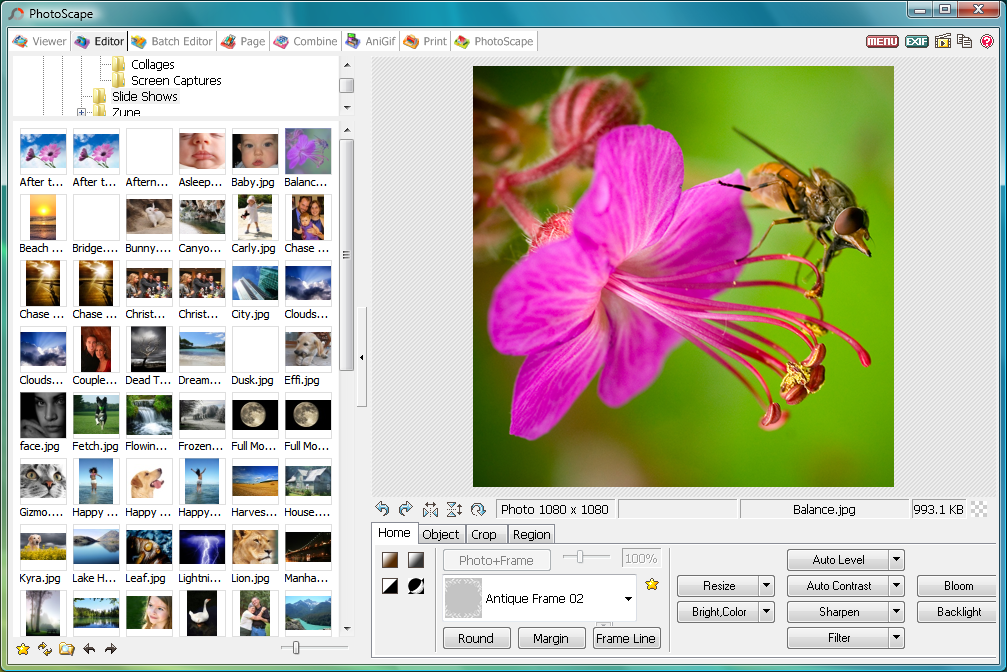
Kumpulan Software Gratis Free Download Software | PhotoScape 3.6.2 | Already be familiar with this one photo editor. PhotoScape 3.6.2 is a freeware which serves to assist editing your photos for editing simple or advanced. Software is well known for lightweight and flexible when run, and only takes up very little CPU usage. For a freeware, this software can be relied


Screenshot:
Kumpulan Software Gratis

Kumpulan Software Gratis

Download:
READ MORE - PhotoScape 3.6.2

Sunday, September 2, 2012

PhotoScape 3.6.2 Full


Kumpulan Software Gratis Free Download Software | PhotoScape 3.6.2 Full | Surely familiar with this software. PhotoScape does offer many facilities for free or free.But one must not see her free. PhotoScape featured on this 3.6.2 is not inferior to otherphoto editor features. With PhotoScape 3.6.2, you can combine images, crop, frame,create animated GIF images, screen capture, and much more.


Screen Shot :

Kumpulan Software Gratis


 What's new in this version :
  • Sorting bug of Folder list fixed
  • Upgraded default saving folders for Page, Combine and Animated GIF Tabs
  • Exif button on Editor Tab
  • Additional support for RAW files such as Samsung Raw File
  • Improved UI
  • Fixed minor bugs

Tutorial PhotoScape :


Download Via Sharebeast :
Download | PhotoScape 3.6.2  - (17.3 MB)


Download Via Mediafire :
Download | PhotoScape 3.6.2 - (17.33 MB)


^_^

READ MORE - PhotoScape 3.6.2 Full

Tuesday, August 21, 2012

OnOne Perfect Portrait

Kumpulan Software Gratis
Kumpulan Software Gratis Free Download Software |  OnOne Perfect Portrait | Perfect Portrait 1 is a completely new product that offers the latest innovations in portrait retouching for photographers. Photographers can now focus on the art of portrait creation because the most time consuming retouching tasks have been automated in Perfect Portrait. Perfect Portrait automatically finds faces, eyes and mouths in images so that photographers can get directly to the work of retouching and enhancing an image. Improving skin texture and color, removing blemishes and enhancing features like eyes, lips and teeth have never been easier. 
Screenshot :
Kumpulan Software Gratis


What's new in Perfect Portrait 1.0.0
• Designed Expressly for Portrait Retouching
You get just the tools you need to quickly enhance and retouch portraits. We've purposefully kept out any unnecessary tools or controls that would get in your way.
• Automatic Face Detection
More than just finding each face, Perfect Portrait also quickly finds the eyes and mouth in a portrait automatically. Because the features are identified right away, you can quickly get to the task of enhancing those critical features.
• Automatic Feature Detection
More than just finding each face, Perfect Portrait also quickly finds the eyes and mouth in a portrait automatically. You no longer have to waste time painting in the features or using complicated manual "wizards". Because the features are identified right away you can quickly get to the task of enhancing those critical features.
• Retouch Brush
The brand new retouch brush removes acne, stray hairs, veins or other large blemishes. Just dab the retouch brush on a blemish and it is gone automatically. It's never been this easy before.
• Skin Blemish Removal and Smoothing
With Perfect Portrait, you will get great looking natural skin automatically because Perfect Portrait maintains realistic skin structure so portraits don't look over retouched. You can quickly reduce small blemishes like wrinkles and deep pores and smooth the skin to an even consistency. Perfect Portrait can be used on just the face or the entire body.
• SkinTune Color Correction
Perfect Portrait helps you achieve accurate and natural skin color automatically. This color correction technology adjusts color based on the skin color and ethnicity of each face in the image.
• Works Where You Do
Perfect Portrait works directly with Lightroom and Aperture and even as a standalone application. It also works as a plug-in to Adobe Photoshop and Adobe Photoshop Elements.

READ MORE - OnOne Perfect Portrait

Saturday, August 18, 2012

Ashampoo ® Photo Commander 10

Kumpulan Software Gratis
Kumpulan Software Gratis Free Download Software | Ashampoo ® Photo Commander 10 | Digital cameras have revolutionised photography, but the downside is that most hard drives are now cluttered up with thousands of photos, and keeping track of them all can be a nightmare. Add to that the fact that many imperfect photos can be improved with the right software and you’re left wondering how to manage it all.

In the past you’d have one program for managing your photos, and another for editing them. These days, though, an increasing number of programs – Ashampoo Photo Commander among them – aim to provide a one-stop shop for organising and fixing all of the images on your computer.

The program splits its feature set into five sections: Common, Quick-Fix, Edit, Create and Organize. All the photo management tools are found under Organize, including batch processing and renaming, duplicate finder and tools for rotating and optimising JPEG files without affecting the quality. Unlike tools like Windows Live Photo Gallery and Picasa, the program doesn’t attempt to catalogue all your pictures; instead, you select photos from your hard drive, or create albums into which you drag and drop a group of photos for easy access in future.

The Quick Fix section enables you to easily and swiftly correct problems like lighting with a single click. It also contains a number of filters, effects and other quick edits. Switch to the Edit tab for more extensive editing controls, or select Create to generate slideshows, collages, calendars, contact sheets and more.

This is the brand new Ashampoo Photo Commander 10. New features/additions include:

- Faster program startup and less memory consumption
- Photo import from digital cameras and improved support for RAW formats
- Upload photos or complete photo albums to Facebook/YouTube/Picasa/etc.
- Optimized and extended 1-click photo optimization
- New photo tools, e.g. Repair Tool or Focus Effect Tool
- Improved image adjustment with a new gradation curve tool, histogram and improved controls
- Improved support for color profiles in JPG files and support for the Google image format WebP
Verdict:

Ashampoo Photo Commander may seem overpriced compared to free software like Google Picasa, but it does at least offer plenty of tools and features missing from the freebies.

READ MORE - Ashampoo ® Photo Commander 10

Sunday, July 8, 2012

Ashampoo Photo Optimizer 5 v5.0.2 Full With Patch

Ashampoo Photo Optimizer 5 v5.0.2 Full With Patch
Kumpulan Software Gratis | Ashampoo Photo Optimizer 5 v5.0.2 Full With Patch | Been a long time did not post photo editor software.
READ MORE - Ashampoo Photo Optimizer 5 v5.0.2 Full With Patch

Wednesday, July 4, 2012

WebcamMax 7.6.4.8 Full Patch + Keygen

WebcamMax 7.6.4.8 Full Patch + Keygen
Kumpulan Software Gratis | WebcamMax 7.6.4.8 Full Patch + Keygen | I used to share WebcamMax 7.6.4.6 was already there with the new version adds several new features.
READ MORE - WebcamMax 7.6.4.8 Full Patch + Keygen

Monday, July 2, 2012

Photo Slideshow Creator 3.0 Full + Serial

Photo Slideshow Creator 3.0 Full + Crack
Kumpulan Software Gratis | Photo Slideshow Creator 3.0 Full + Serial | If you have photos you want to show in a slideshow video, what you usually do? Use Powerpoint? Video Editor or sophisticated?
READ MORE - Photo Slideshow Creator 3.0 Full + Serial

Wednesday, June 13, 2012

Adobe Photoshop CS6 Extended (x86/x64) Full + Patch

software edit foto super canggih
Kumpulan Software Gratis | Adobe Photoshop CS6 Extended (x86/x64) Full + Patch | Who does not know this famous photo editing software, Adobe Photoshop a while ago has released the newest version in 2012, namely Adobe Photoshop CS6 Extended (x86/x64).
READ MORE - Adobe Photoshop CS6 Extended (x86/x64) Full + Patch

Tuesday, June 12, 2012

Adobe Photoshop Lightroom 4.1 Full + Keygen + Patch

Adobe Photoshop Lightroom 4.1 Full + Keygen

Kumpulan Software Gratis | Adobe Photoshop Lightroom 4.1 Full + Keygen + Patch | Several months ago I've ever share Adobe Photoshop Lightroom 4, but since the link dies and there is a newer version so I share it.
READ MORE - Adobe Photoshop Lightroom 4.1 Full + Keygen + Patch

Sunday, June 3, 2012

PhotoInstrument 5.5 Full + Preactivated

Kumpulan Software Gratis | PhotoInstrument 5.5 Full + Preactivated | PhotoInstrument is one of the tools that serve to beautify the face. For example, to refine (acne scars) on the surface of the skin.
READ MORE - PhotoInstrument 5.5 Full + Preactivated